
Batch labels
Batch and version labels, read as metadata
A label line tells you how the seller files the variant. It does not grade the goods, and the operator’s own policy forbids reading it that way. Here is what a label can carry, what it cannot, and how to use it when one find has four listings.
Anatomy
What a label line can tell you
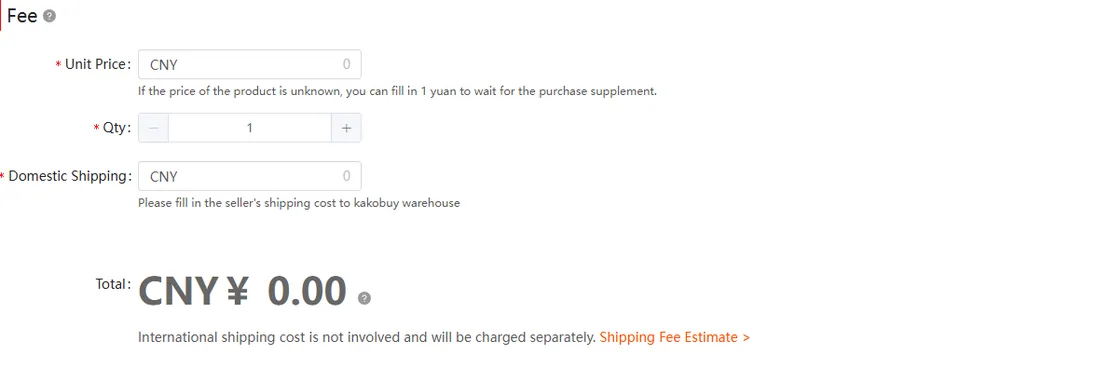
Three things, reliably. First, which variant the card points at: the colourway, the size run, the bundle. Second, which price tier the seller attached to that variant; the Fee block on a manual order spells this out as unit price, quantity and domestic shipping, and asks you to submit exact figures. Third, which platform the listing lives on, because platform decides the rules that apply to your order.
Submitting with the wrong unit price or quantity is not a rounding error: the order simply does not go through as filed, and you cancel and refile. Exactness is the whole job.
What a label cannot tell you
A label is the seller’s own shorthand. Two shops can hang different labels on the same factory output, or the same label on different output; nothing in the text is checkable before the parcel reaches the warehouse. The operator draws a hard line here: listings for non-authentic goods are prohibited outright, suspect listings get removed, and orders against them can be declined or disposed of (Anti-Counterfeiting Policy, help id 125, article dated 2024-10-08 and unchanged through 2026-10-10).
So the honest reading is procedural: a label narrows which variant you get, never what grade you get. Anything that promises otherwise is a listing to walk away from, not a bargain.
Side by side
One find, four listings: the comparison that matters
Put candidate listings side by side and compare fields, not vibes. The two dossiers below are live finds from the catalogue, annotated the way the helper reads them.

Square Metal Frame Eyeglasses with Decorative Hi

Goyard Saint Louis PM Crossbody Bag
Price belongs in the comparison as a fact you weigh, not a score the site computes. When the cheaper card also carries a flag, the flag wins; a saved difference means nothing on an order you cannot unwind. And a blank price field is itself a reading: the left-hand card does not publish one, so that number has to come off the source listing before you can compare anything.
Make a comparison that can be checked later
Use one line for each candidate: platform, shop, original item ID, selected option, quantity, included accessories and current item-plus-domestic price. Record the seller’s batch or version label exactly as written, then keep it in the “seller claim” column. Do not convert that wording into an authenticity or quality grade.
If listing A has a detailed size chart and listing B shows a lower starting price but no clear selected option, obtain the missing information before choosing. A comparison is incomplete until the two prices describe the same intended purchase. Similar promotional photographs do not resolve that gap.
Prior warehouse photos can help identify visible details only after their seller, item and variant match. Keep the observation date with them. Your own order is ultimately checked against the filed specification, so preserve the evidence you used instead of relying on a label remembered from a card.
The pre-submit read on a candidate listing
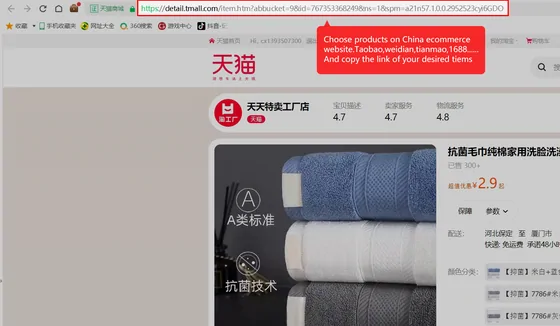
Work the card top to bottom. Match every variant photo against the option tiles; a listing whose gallery shows options the selector does not sell is filed wrong, and wrong filings turn into wrong parcels. Check the quantity field against what the seller requires; on wholesale listings the floor is real. Read the label line for policy smells: text that markets around the authenticity rules fails before it ships.
Wholesale mechanics themselves, minimum quantities and quantity-tiered unit prices, are the operator’s subject and stay one sentence long here: the official rules page for purchasing on 1688 covers both, and that is the page to read before touching a wholesale listing.
The deeper red-flag list, seller credit included, lives on the sellers page.
Where the label meets the warehouse
After stock-in, the listing stops being text: the parcel either matches the card or it does not. That is when the label does its last job, as the reference you check the quality photos against inside the 120-hour window. The guide places that moment in the pipeline, and cancellations and returns covers what each outcome costs.
