


Match the variant
Read the colour and size options against the gallery. Save the selected option and seller link before paying.
Batch and version labelsFinds, with the details that matter
Browse clothing, sneakers and accessories, then compare the listing details before you order.
A product discovery catalogue: pictures, categories and store links that help you build a shortlist. A listing is a starting point; the seller’s page confirms the available sizes, colours and price.
Batch names and version labels describe how a seller lists a product. They do not prove its quality or authenticity. Learn to read a listing label.
Kakobuy is a shopping agent. You submit a product link and chosen variant; the agent purchases it, receives it at the warehouse, provides inspection photos and arranges international shipping after you submit a parcel.
Meet the agent and its limits →
A lower card price is useful only when the variant, quantity and seller terms work for your order.
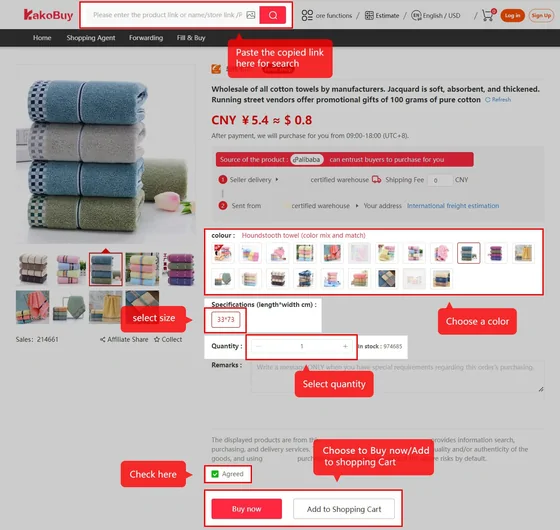
Read the colour and size options against the gallery. Save the selected option and seller link before paying.
Batch and version labelsCheck minimum quantities, seller history and return exclusions. A label alone is not a quality guarantee.
Seller checks and red flagsEnter their labels and prices in our decision helper. Add only the flags you can verify; it explains each caution.
Open the comparison helper →The product price is the beginning. Plan for purchase, warehouse inspection and international shipping before funding an order.

Purchase assistance, warehouse photos and parcel submission keep the order stages in one account. Check supported items, payment terms and shipping options before you commit.
Another agent may suit you better if it offers the payment method, destination route or after-sales support your purchase needs.
Read the benefits and trade-offs →Browse by product category, understand seller labels and compare two candidates without invented batch scores. Detailed guides explain the checks behind each step.
We separate dated policy records from live prices and keep the original seller link central to the buying decision.
How to judge a product catalogue →No. It is seller metadata. Compare the selected variant, shop terms and warehouse photos; the label is not an authenticity certificate.
No. Domestic freight, international freight, payment charges and optional services can add to the item price. Read the cost breakdown.
Use official Kakobuy support with the relevant order number and screenshots. This independent catalogue cannot access your order. Help and terminology.